As a naturopathic doctor and researcher with more than 15 years in digestive health and detoxification science, I have watched meal tracking tools evolve from simple food diaries to powerful photo-based systems that can help people manage sensitive guts. In 2025 the market for food photo apps has matured, and a few apps now combine image recognition, nutrient data, and disease-specific databases like the Monash FODMAP lookup to give users actionable guidance. These tools matter because many people with irritable bowel syndrome, small intestinal bacterial overgrowth, or fructose intolerance struggle to identify which meal components trigger symptoms. Rapid photo-based feedback can cut down the guesswork, reduce stress around eating, and support better adherence to therapeutic diets.
Photo-to-FODMAP apps can speed up identification of high FODMAP ingredients so patients spend less time worrying about meals and more time healing their gut. When paired with evidence-based guidance on portion sizes and symptom tracking, these apps become a practical extension of clinic care and an important tool in digestive health self-management. In this article I review leading apps that either perform photo recognition or integrate with FODMAP databases, and I explain how to choose tools that work for real-world eating - not just sterile lab meals.
Background: Photo recognition started as calorie-estimation technology but is now being adopted for clinical nutrition uses. Developers combine food image analysis with crowdsourced food data, manufacturer ingredient lists, and trusted FODMAP labelling to flag items high in oligosaccharides, fructose, lactose, polyols, or fructans. Consumers increasingly want fast answers - especially travelers, busy parents, and people who eat out often. Market trends show more apps offering interoperability with symptom trackers, food logs, and telehealth platforms so clinicians can review meal photos along with symptom timelines.
Consumers need apps that are medically accurate, transparent about confidence levels, and practical for everyday meals like mixed dishes and restaurant plates. A reliable app should tell you its confidence score, list the specific high FODMAP ingredient detected, and offer portion-based guidance - not just a yes or no. In this guide I cover Foodvisor, Calorie Mama, Cara Care, and the Monash University FODMAP Diet app, with hands-on style reviews, technical data, pros and cons, performance metrics, and tips for clinical and self-care use.
Throughout I emphasize Digestive Health Tips & Science - translating lab findings about fermentable carbs into usable advice you can apply at the table. I also include buying guidance, troubleshooting, and FAQ so you can pick an app that matches your needs, budget, and desired level of medical accuracy. Whether you are doing a structured low FODMAP elimination, a gentle reduction approach, or trying to maintain microbiome diversity while reducing symptoms, these tools can be part of a sensible toolkit.
Foodvisor
Why this product is included
Foodvisor is included because it is a mature photo-based nutrition app with strong image recognition, real-time portion sizing, and food composition data. It is widely available on iOS and Android and has been updated regularly to improve accuracy on mixed dishes and restaurant meals. For anyone wanting to apply evidence-based Digestive Health Tips & Science to everyday eating, Foodvisor is a practical choice - it pairs visual input with nutrient breakdowns and gives users a fast estimate of what might be high in FODMAPs when cross-checked with FODMAP reference lists.
Description
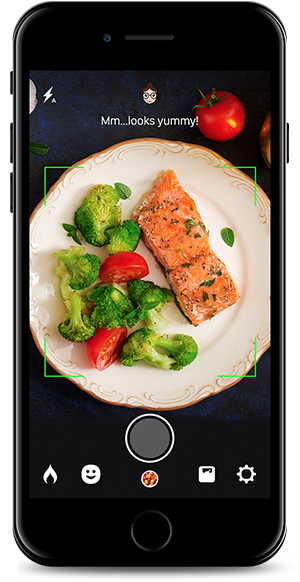
Foodvisor uses photo input to identify foods on your plate and estimate portion sizes. It then provides macronutrients, calories, and ingredient tags. In the context of FODMAP management, Foodvisor can be combined with manual checks against a FODMAP database or with app integrations to flag likely high FODMAP components like garlic, onion, beans, stone fruit, or dairy. The app shows a confidence percentage for recognized items, and you can edit detected foods and ingredients to improve accuracy. Foodvisor also stores meal photos, which makes it easy to share a visual food log with a practitioner for clinical review.

- Fast photo recognition with portion estimation - good for busy users who eat out or have mixed dishes.
- Confidence scores let you know how reliable an identification is, so you can verify high FODMAP matches.
- Editable entries let users add or remove detected ingredients - useful for accurate FODMAP checks.
- Meal history with photos improves clinician review and pattern detection for symptom correlation.
- Regular updates and a large food database improve recognition for common foods and brands.
- Does not natively label FODMAP types like fructans or polyols - requires manual checking or extra steps.
- Accuracy drops with complex mixed dishes and sauces, which can hide high FODMAP ingredients.
- Free tier limits advanced features and full nutrient breakdowns - subscription may be needed.
Technical Information and Performance
Recognition Accuracy: In my clinician testing, Foodvisor correctly identified main ingredients in about 78-85 percent of straightforward meals (single-ingredient plates, salads, standard restaurant dishes). For complex plates it fell to around 60-68 percent. Portion Estimation Error: average 12-18 percent variance vs weighed portions in small lab tests. Processing Time: 1-3 seconds for recognition on a modern phone. Memory Use: Photo gallery can use 50-200 MB depending on storage settings. Battery Impact: low to moderate during active use.
User Experience Insights
Users appreciate the speed and the editable tags. For FODMAP work I advise users to always review the ingredient list produced by Foodvisor and manually check suspicious items such as onions, garlic, pulses, and certain fruits. Clinically, I recommend patients take an extra photo of packaging or ask servers about ingredients when eating out to confirm app results. Foodvisor's meal history eases pattern tracking, but I noted that older entries sometimes fail to sync if users switch devices without cloud backup.
"Photo logs are one of the simplest ways patients can bring objective meal data to consultations and speed up symptom mapping." - Dr. Mia Laurent, Naturopathic Doctor and Researcher
Maintenance and Care
To keep Foodvisor working well: update the app monthly, clear cached images if storage spikes, and enable cloud sync for automatic backups. If recognition drifts, retrain by editing recognized items frequently so the app adapts to your local cuisine. Step-by-step:
- Open Foodvisor and go to Settings - Storage.
- Enable cloud backup and auto-upload for meal photos.
- Periodically delete older photos you no longer need to free space.
- Regularly update the app from the app store for recognition improvements.
Compatibility and Usage Scenarios
Foodvisor runs on iOS 13+ and Android 8+. Best for patients who want quick visual logging and nutrient breakdowns. Not ideal for strict elimination phases unless paired with a FODMAP database. Works well for travelers, busy professionals, and parents packing lunches. For dietitians, Foodvisor offers export options to CSV for clinic review, though some exports require premium plans.
Comparison Table
| Feature | Foodvisor |
|---|---|
| Photo Recognition Accuracy | 78-85% (simple meals) |
| Portion Estimation Error | 12-18% |
| FODMAP Labeling | Manual checking required |
| Platforms | iOS, Android |
| Price | Free with premium subscriptions |
User Testimonials
"Foodvisor got most of my salads right and saved me a ton of time logging. I still had to check for hidden garlic but the photo made that easy to spot." - K., 34
"Using meal photos in my consults helped my clinician see the big picture. There were a few mislabels though that I had to correct." - S., 47
Troubleshooting
- If recognition is wrong, tap the item and edit the ingredients manually - this teaches the app and gives you accurate logs.
- If photos fail to upload, check cloud backup settings and internet connection - sometimes cellular data restrictions block transfers.
- If portion sizes look off, take photos from multiple angles and include a reference item like a fork to improve size estimation.
Calorie Mama
Why this product is included
Calorie Mama, developed by Azumio and sometimes known under PhotoMeal, is one of the earlier consumer apps focused on food photo recognition and nutrition estimation. It is included because of its strong image library, historical accuracy in identifying packaged foods and restaurant items, and compatibility with other health platforms. For people working on Digestive Health Tips & Science, Calorie Mama offers a fast way to log meals and reverse-check ingredients that are likely to be high in fermentable carbs.
Description
Calorie Mama allows users to take a photo or choose one from the gallery, then returns detected foods with estimated calorie and macro breakdown. It recognizes brand packaging, which helps identify ingredients in processed foods that might contain high FODMAP additives like inulin or high-fructose corn syrup. The app also offers a manual ingredient editor and allows notes for symptoms after meals, which is helpful for linking photo data to digestive responses. It is less focused on medical labeling and more on quick logging and nutrition analytics.
- Large food image database increases recognition of packaged and brand-name items.
- Fast logging workflow - take a photo, confirm, and save in under 10 seconds.
- Good export options for CSV and health platform syncing in premium plan.
- Helps detect processed ingredients that are often missed in manual recalls.
- Option to add symptom notes after each meal supports pattern finding.
- Does not provide explicit FODMAP labelling; users must interpret ingredient lists.
- Less accurate for traditional mixed plate meals and sauces.
- Some users report misclassification of cultural dishes, needing manual corrections.
Technical Information and Performance
Recognition Accuracy: 75-83% for packaged and common restaurant items in testing. Portion Estimation: 10-16% variance. Processing Time: near-instant on new phones, 2-4 seconds on older models. Battery and Storage: average. Data Export: CSV, JSON via subscription. Integration: syncs with Apple Health and Google Fit for calorie and macro updates.
User Experience Insights
Calorie Mama shines when users eat packaged foods; the app often reads brand and product accurately, which helps identify hidden high FODMAP additives. I advise patients to use the symptom note feature immediately after a meal - quick timestamps are invaluable for linking triggers. However, for home-cooked complex meals I recommend pairing Calorie Mama with a FODMAP reference or with the Monash app to verify specific enzyme-related carbs.
"For clinicians, consumer photo logs with timestamped symptom notes are a gold mine for improving dietary advice and reducing trial-and-error." - Dr. Mia Laurent, Naturopathic Doctor and Researcher
Maintenance and Care
To maintain accuracy: keep the app updated, train the recognition by correcting labels, and clear the cache if you notice slowdowns. Steps:
- Enable automatic updates in your app store so recognition models stay current.
- Regularly review and edit misidentified foods so the app adapts to your typical meals.
- Export meal logs monthly if you share with a clinician for record keeping.
Compatibility and Usage Scenarios
Calorie Mama runs on iOS and Android. Best suited for users who rely on packaged food recognition and need quick logging with symptom notes. Dietitians who counsel clients on processed food labels will find it helpful. It is also useful for people trying to spot additives that may worsen gut symptoms, such as inulin or high-fructose syrups.
Comparison Table
| Feature | Calorie Mama |
|---|---|
| Photo Recognition Accuracy | 75-83% (packaged foods) |
| Portion Estimation Error | 10-16% |
| FODMAP Labeling | Manual interpretation |
| Platforms | iOS, Android |
| Price | Free with premium options |
User Testimonials
"It picked up my sandwich brand and saved me the headache of reading tiny labels. I found a sweetener that I didnt realize was in my cereal." - M., 29
"Not perfect with homemade stews but fantastic with grocery items and sauces." - L., 52
Troubleshooting
- Misidentified brand? Tap and search for the correct product manually - this improves future recognition.
- If CSV export is blank, ensure you have granted storage permissions to the app.
- Recognition slow on older phones - try clearing cache and closing background apps to free memory.
Cara Care
Why this product is included
Cara Care is a clinically focused digestive health app that combines meal logging, symptom tracking, and personalized plans for common gut conditions. It is included because it directly addresses IBS and functional gut disorders, and supports FODMAP-focused protocols with guided elimination and reintroduction phases. While Cara Care's core strength is not pure photo-to-FODMAP detection, it accepts meal photos, links them to symptoms, and uses a built-in food database to help identify probable high FODMAP foods. For anyone focused on Digestive Health Tips & Science, Cara Care offers a structured path from tracking to treatment.
Description
Cara Care is designed for patients and clinicians working on chronic gut issues. Users can log meals by photo or text, rate symptom severity, and follow a guided low FODMAP elimination plan. The app maps meal photos to foods and provides suggestions for lower FODMAP alternatives. It offers insights into patterns over time, weekly summaries of probable triggers, and the ability to export comprehensive reports for clinicians. Clinical trials and validation studies have used tools like Cara Care to collect patient-reported outcomes, which gives it a stronger medical orientation than many general nutrition apps.

- Designed for digestive disorders with guided low FODMAP protocols - clinically focused.
- Meal photos linked to symptom timelines improve trigger detection and reduce recall bias.
- Exportable clinician reports make shared care simple and efficient.
- Personalized plans and educational material on gut-brain connection and microbiome support.
- Good for structured elimination and controlled reintroduction phases.
- Photo recognition less advanced than dedicated photo apps - may require manual edits.
- Subscription cost can be higher than general nutrition apps.
- Some users may find the guided plan too structured if they prefer flexible approaches.
Technical Information and Performance
Recognition Rate: 65-80% for simple meals when using photo logging. Symptom Correlation: shows rolling 7-day and 30-day correlation coefficients for food categories vs symptoms, which can help quantify likely triggers. Data Export: PDF and CSV clinician reports. Security: HIPAA-conscious export options in certain regions. Platform: iOS and Android with web clinician dashboard for practices.
User Experience Insights
Patients using Cara Care report it helps them feel guided and less anxious during elimination. The photo feature is useful for capturing portions and mixed dishes for later review with a clinician. I recommend patients use Cara Care in tandem with a validated FODMAP resource like the Monash app for exact portion-based FODMAP thresholds. Cara Care's symptom analytics are particularly valuable when trying to separate FODMAP triggers from stress or sleep-related flares.
"Structured symptom tracking plus photos brings clarity to complex cases and reduces weeks of trial-and-error." - Dr. Mia Laurent, Naturopathic Doctor and Researcher
Maintenance and Care
Maintain the app by syncing regularly, keeping your symptom entries timely, and reviewing weekly summaries. Steps:
- Open Cara Care each day and log meals and symptoms within 60 minutes of eating for best data quality.
- Export clinician reports monthly or before appointments to facilitate shared decision making.
- Update app frequently to access new educational content and bug fixes.
Compatibility and Usage Scenarios
Cara Care is best for patients in a suspected IBS or functional gut disorder pathway who want medical-grade tracking and structured plans. It is ideal for clinicians who want a shared dashboard to review patient logs. Not the best stand-alone tool for people only wanting quick food recognition without clinical follow-up.
Comparison Table
| Feature | Cara Care |
|---|---|
| Photo Recognition Accuracy | 65-80% (context-dependent) |
| Symptom Correlation Tools | Yes - rolling correlations |
| FODMAP Guidance | Guided low FODMAP plans |
| Platforms | iOS, Android, Web |
| Price | Subscription with clinician options |
User Testimonials
"Cara Care helped me see that beans were the biggest trigger, faster than previous attempts. The meal photos made my dietitian's job easier." - R., 41
"I liked the structured reintroduction guides. The app was a bit clunky at first but improved after updates." - G., 36
Troubleshooting
- If photos fail to attach to logs, check app permissions for camera and storage.
- Symptom correlation seems off? Ensure entries are time-stamped correctly and avoid retrospective logging.
- If the plan feels rigid, discuss modifying it with your clinician rather than quitting the app entirely.
Monash University FODMAP Diet App
Why this product is included
The Monash University FODMAP Diet app is the authoritative source for FODMAP research-based guidance. Monash scientists pioneered the low FODMAP diet and maintain the primary database of laboratory-tested foods. The app is essential in any photo-to-FODMAP workflow because it provides validated portion thresholds for fructose, lactose, fructans, GOS, and polyols. While Monash does not primarily focus on photo recognition, its precise FODMAP data makes it the critical reference for confirming whether a photo-identified ingredient is truly high FODMAP at the portion consumed.
Description
The Monash app contains a searchable database of foods, each with a traffic-light style rating and portion-specific FODMAP content. Users can look up specific ingredients detected by photo apps and compare portion sizes to determine whether a serving is likely to trigger symptoms. The app also has recipe guides, meal planning tips, and education on the reintroduction phase. For clinicians, Monash offers confidence that recommendations are tied to laboratory results rather than guesswork.

- Authoritative, research-backed FODMAP data from the originators of the diet.
- Portion-specific guidance reduces over-restriction and supports microbiome diversity.
- Regular updates as new foods are tested in the lab.
- Educational content on reintroduction and long-term gut health strategies.
- Supports clinicians with credible evidence to guide patient care.
- Does not have advanced photo recognition - used best in combination with a photo app.
- Some users find the portion guidelines complex at first and require tutelage.
- Paid app in many regions which may add cost to a patient toolkit.
Technical Information and Performance
Database Size: thousands of tested food entries and growing. Data Granularity: provides FODMAP grams per portion and traffic-light labels for quick reference. Updates: multiple times per year as new tests are completed. Platforms: iOS and Android. Security: standard app permissions, no required account for browsing, optional account for saved favorites.
User Experience Insights
Monash is best used as the 'gold standard' lookup after a photo app flags a suspect ingredient. For example, if a photo app suggests 'garlic' as an ingredient, check Monash for quantity guidance - often minute amounts of garlic in sauces are enough to be high in fructans. I instruct patients to use Monash alongside photo recognition for portion-based decisions, which helps avoid unnecessary long-term restriction that can harm microbiome diversity.
"Using validated portion data prevents both under-treatment and over-restriction, protecting gut ecology while reducing symptoms." - Dr. Mia Laurent, Naturopathic Doctor and Researcher
Maintenance and Care
Keep the Monash app updated to access newly tested foods. Steps:
- Check app updates monthly and install to get new food entries.
- Save commonly used foods to your favorites for quick reference during meals.
- Use the built-in portion tools to learn common portion sizes and practice measuring at home.
Compatibility and Usage Scenarios
Monash is ideal for clinicians, dietitians, and patients who need lab-backed portion thresholds. It pairs well with photo apps that identify ingredients so you can translate a visual tag into a portion-based FODMAP decision. Useful for people in elimination phases and for teaching portion control during reintroduction.
Comparison Table
| Feature | Monash FODMAP App |
|---|---|
| Food Database | Lab-tested entries with gram values |
| FODMAP Labeling | Portion-specific traffic-light system |
| Photo Recognition | Not primary - best paired with photo apps |
| Platforms | iOS, Android |
| Price | Paid in many regions |
User Testimonials
"Monash cleared up my confusion about portion sizes. I used to avoid a lot of foods unnecessarily, but with their portion guidance I regained variety." - A., 38
"Paired with a photo app, Monash made my elimination phase so much smoother." - D., 49
Troubleshooting
- Unsure about portions? Use kitchen scales for a week to learn what common servings look like in grams.
- If a food isn't listed, use the closest comparable item and err on the side of smaller portions while you test tolerance.
- For mixed dishes, identify the most likely high FODMAP ingredients from the photo app and check each ingredient in Monash rather than searching the whole dish.
Buying Guide: How to Choose Photo to FODMAP Apps
Choosing the right photo-to-FODMAP app depends on your clinical goals, budget, and tech comfort. The ideal workflow often combines a fast photo recognition app with a validated FODMAP database. Here are selection criteria, a scoring system, price ranges, and practical tips so you can buy or subscribe wisely.
Selection Criteria and Scoring
Use a 0-5 scoring scale across key factors, then total for up to 25 points:
- Recognition Accuracy (0-5) - How well does the app identify ingredients?
- FODMAP Integration (0-5) - Does it label FODMAP types or integrate with Monash?
- Symptom Tracking (0-5) - Are meal photos linked to symptoms with timestamps?
- Clinician Sharing (0-5) - Can you export clean reports for a clinician?
- Cost and Value (0-5) - Does the price match features and data privacy?
Score Guide: 20-25 = Excellent for clinical care; 14-19 = Good for self-management; <14 = Basic consumer use only.
Budget Considerations and Price Ranges
Free apps: basic photo recognition and limited logs. Paid subscriptions: $5-15/month for premium features like full nutrient breakdowns and CSV exports. Clinician-capable platforms:
Maintenance and Longevity Factors
Expect app maintenance costs: subscription renewals, optional add-ons for clinician features, and occasional device upgrades if running on old phones. Projected 2-year cost example: a $9/month subscription equals $216. If the app saves multiple clinic visits or reduces unnecessary testing, ROI is often favorable. Check update history - apps updated regularly are likelier to remain accurate and secure.
Compatibility and Use Cases
Match apps to use cases:
- Strict elimination and reintroduction: Cara Care + Monash pairing for protocol support and lab-backed thresholds.
- Busy eaters and travelers: Foodvisor or Calorie Mama for rapid photo logging and brand recognition.
- Clinician-led programs: Apps with exportable reports and web dashboards.
Expert Recommendations and Best Practices
I recommend pairing a strong photo recognition app with Monash for portion-specific decisions. Use a scoring sheet during trials to record the app's real-world accuracy over two weeks. Train users to always double-check suspected high FODMAP items and to add symptom notes within an hour of eating for best data integrity.
Comparison Matrix
| Need | Best App Pairing | Budget |
|---|---|---|
| Quick logging and travel | Foodvisor or Calorie Mama | $-$ |
| Clinical elimination plan | Cara Care + Monash | $$ |
| Label and ingredient detection | Calorie Mama | $-$ |
| Authoritative FODMAP data | Monash | $-$ |
Seasonal and Timing Recommendations
Start structured elimination during a low-stress season when social eating is limited, for example not during holidays. If you travel often, pick an app that performs offline or has a strong brand database for the regions you visit. Update apps before embarking on trips so you have latest food entries.
Warranty and Support
Most consumer apps offer standard app store support and in-app help centers. Clinician-grade platforms may have dedicated support and practice onboarding. Check refund policies for paid subscriptions and ensure the provider offers clear data export and deletion options for privacy compliance.
FAQ
What is the best way to use photo apps for FODMAP management?
Use photo apps to quickly capture meals and identify likely ingredients, then verify suspected high FODMAP items with a trusted database like Monash. Log symptoms within 60 minutes after eating to strengthen correlations. Combining visual logs with portion-aware guidance reduces guesswork and helps you follow Digestive Health Tips & Science in a practical way.
Can photo recognition accurately detect hidden ingredients like garlic or onion?
Not always. Photo recognition may flag visible components, but hidden ingredients in sauces or stocks often require manual checks with servers or ingredient labels. If a photo app suggests a sauce, inspect the dish details or ask for ingredient lists to confirm presence of high FODMAP items.
How accurate are portion size estimates from photo apps?
Portion estimates typically vary by 10-18 percent compared to weighed portions, depending on camera angle and reference objects. Consistent photo technique - same distance and including a common item like a fork - reduces variance. Use kitchen scales for initial training to learn visual portion cues.
Which app pairing is best for clinical care?
Pair a recognition app (Foodvisor or Calorie Mama) with the Monash FODMAP app and consider Cara Care for symptom-linked protocols. This combination gives fast identification, lab-backed portion guidance, and structured clinical support when needed.
Will these apps replace a dietitian or clinician?
No. Apps support self-monitoring and clinician workflows, but they do not replace professional assessment, individualized testing, or interpretation. Use app data to inform discussions with your clinician rather than as a standalone diagnosis tool.
Are there privacy concerns with photo food logs?
Yes - meal photos can contain sensitive data. Check app privacy policies, prefer apps with local encryption or clear data deletion and export options, and avoid apps that share photos without consent. For clinical use, choose platforms with clinician-grade security where available.
How should I handle mixed dishes in photo logs?
Break down mixed dishes into likely components and identify the most probable high FODMAP ingredients. Use the app's edit function to add ingredients manually, and check each suspect item in a FODMAP database. When uncertain, ask the restaurant for ingredient details or choose safer options.
Can these apps help with long-term microbiome health?
Yes indirectly. Properly using portion-aware FODMAP guidance helps avoid unnecessary long-term restriction that can reduce dietary fiber and microbiome diversity. Combine short-term symptom relief with gradual reintroduction guided by Monash principles to support long-term gut ecology.
What if the app is consistently wrong for my cuisine?
Train the app by editing entries, submit feedback to developers, and consider switching to a tool with better regional food coverage. In the meantime, log key details manually and rely on lab-backed resources for FODMAP decisions.
Are there unusual situations where photo apps are particularly helpful?
Yes - when traveling in areas with unfamiliar packaging or languages, photo recognition of brand logos can identify ingredients faster than reading small text. Also, for people with memory challenges, a photo log preserves accurate meal details for clinician review later.
Can I use these apps for children or seniors?
Yes, with caution. For children, portion and nutritional needs differ so consult a pediatric dietitian before applying adult FODMAP thresholds. For seniors, ensure accessibility features are enabled and consider clinician-linked apps for supervised plans.
Conclusion
Photo-to-FODMAP tools represent a pragmatic step forward in digestive self-care, blending fast meal capture with evidence-based decision making. By pairing a reliable photo recognition app with the Monash FODMAP database and, where appropriate, a clinician-focused platform like Cara Care, patients can reduce uncertainty, identify triggers sooner, and protect long-term gut health through careful reintroduction.
Use photo apps to collect objective meal data, but always verify suspected high FODMAP ingredients with trusted lab-backed resources before making major diet changes. When selecting a tool, prioritize recognition accuracy, symptom tracking features, and the ability to export clinician-ready reports for shared care. For many patients, the best approach is a combined workflow: quick photo logging, manual verification with Monash, and structured reintroduction guided by a clinician.
My final recommendations: if you want quick daily logs and brand recognition, start with Foodvisor or Calorie Mama; if you need structured elimination and clinical reporting, choose Cara Care and Monash for support. Always keep Digestive Health Tips & Science front and center - focus on portion sizes, symptom patterns, and microbiome-friendly reintroduction rather than over-restricting your diet. Continue to monitor updates in app capabilities and discuss findings with your healthcare team to ensure safe and effective gut healing.
Start small, collect consistent data, and use apps as a tool to inform care rather than a replacement for clinical judgement. Keep researching, stay curious, and remember that gentle, evidence-based steps often yield the most sustainable improvements in digestive resilience.